
Published: November 3, 2026
Last updated: November 3, 2026
Office 365 SMTP AUTH Basic Auth Off by Default From December 2026: Scan to Email, Apps and Scripts
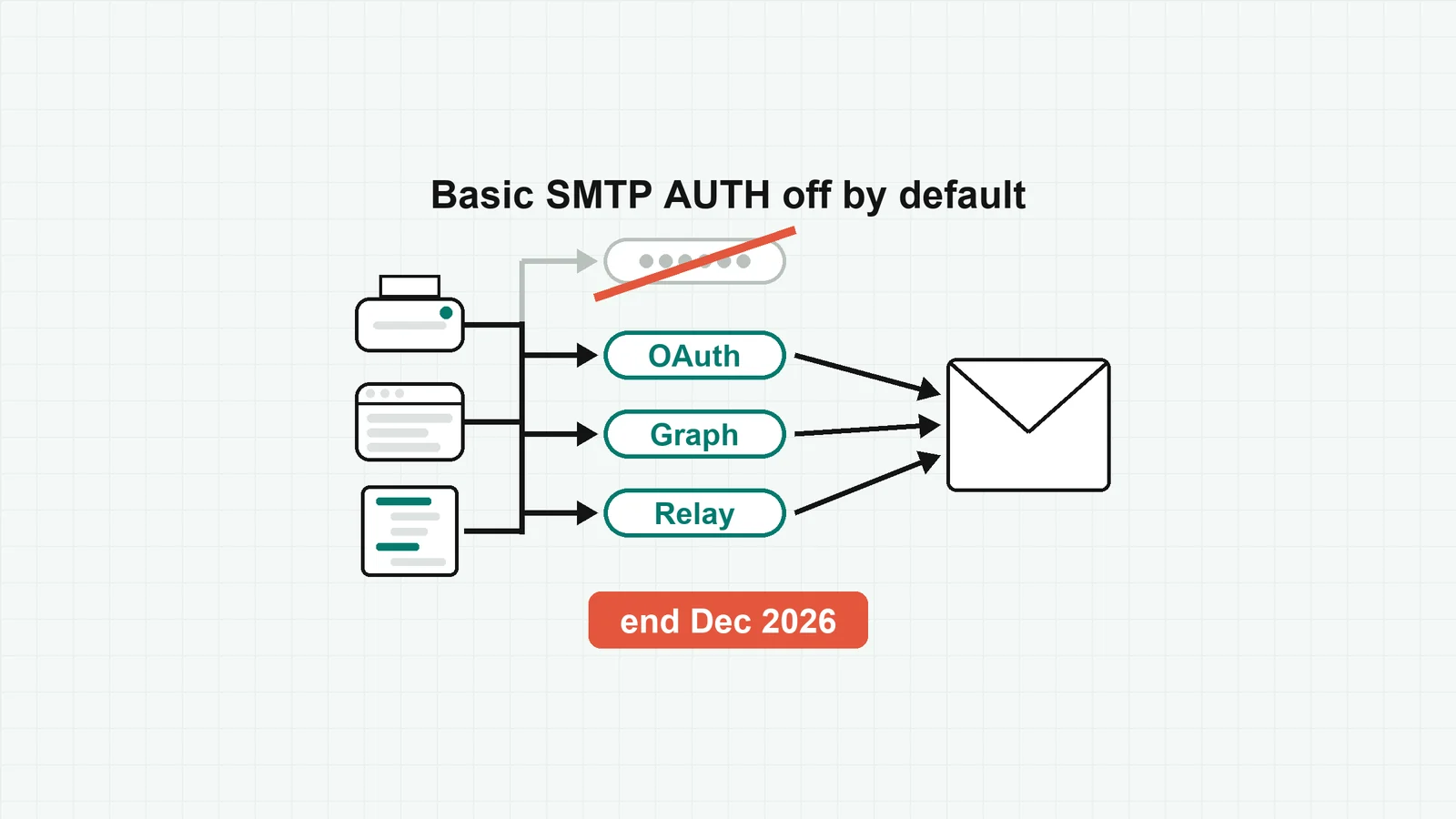
At the end of December 2026, Microsoft will disable Basic authentication for SMTP AUTH by default in existing Exchange Online tenants [1][2]. A scanner, application or script that sends through smtp.office365.com with a mailbox name and password will stop sending, unless an admin turns Basic authentication back on or the sender moves to another method. Microsoft published this timeline on its Exchange team blog at 19:07 UTC on 27 January 2026 [2].
Admins will still be able to re-enable it, and Microsoft will only announce the final removal date in the second half of 2027 [2]. A default changes this winter; for a firm of 10 to 250 people, the work is finding every sender before it does.
What Microsoft announced
- Existing tenants: Basic authentication for SMTP AUTH is disabled by default at the end of December 2026, and "Administrators will still be able to enable it if needed" [2].
- New tenants created after December 2026: Basic authentication is unavailable by default; OAuth is the supported method [2].
- Details to follow: Microsoft "will provide detailed information in a follow up Message Center Post" [1]. On 3 November 2026 we found no such post in the Message Center archive, nor among the Exchange team blog's latest posts [11].
- History: an earlier plan to remove it between 1 March and 30 April 2026 was put on hold [1].
Key dates
| When | What |
|---|---|
| 26 Apr 2024 | Message Center post MC786329 first published |
| 18 Oct 2024 | SMTP AUTH Clients report gains an Authentication Protocol column (Basic or OAuth) |
| 27 Jan 2026 | Updated timeline published |
| Now to Dec 2026 | No change |
| End of Dec 2026 | Basic SMTP AUTH off by default in existing tenants; admins can turn it back on |
| After Dec 2026 | New tenants: Basic SMTP AUTH unavailable by default |
| Second half of 2027 | Final removal date announced |
| Not yet published | The exact day, and Microsoft's follow-up post with the details |
Source for every row: [1] and [2].
Who is affected in a firm of 10 to 250 people
Microsoft says virtually all modern email clients, including Outlook, Outlook on the web and Outlook for iOS and Android, do not use SMTP AUTH to send [3]. The senders that do were mostly set up years ago and left running:
- Multifunction printers and scanners with scan to email, configured with a mailbox, its password and port 587 [5].
- Line-of-business applications, such as an appointment system that emails reminders [5], or a CRM or ERP that sends alerts as a mailbox.
- Scripts and scheduled jobs: a nightly report or a backup alert with a password in its settings.
- Website and accounting send-mail: a contact form plugin, or an invoicing tool that emails invoices and statements through a Microsoft 365 mailbox.
- POP and IMAP mail clients, which need SMTP AUTH to send [3].
Two settings change who notices. Organisations created after January 2020 have SMTP AUTH turned off by default and enable it mailbox by mailbox [5], and security defaults in Microsoft Entra ID already disable SMTP AUTH [3]. Microsoft's timeline does not say whether mailboxes enabled one by one keep Basic authentication after December [1][2], so plan as if they stop.
How to list every sender still using Basic auth
- The report. In the new Exchange admin center, open Reports, then Mail flow, then the SMTP AUTH Clients report. Its Authentication Protocol column shows Basic Auth (TlsAuthLogin) or Modern Auth (XOAUTH2) for each sender address. It shows the last 7 days by default; set the range to 90 days, the maximum, so a monthly job shows up, then export to CSV [4].
- The settings. In Exchange Online PowerShell,
Get-TransportConfig | Format-List SmtpClientAuthenticationDisabledshows the organisation setting, andGet-CASMailbox -ResultSize unlimited | where {$_.SmtpClientAuthenticationDisabled -eq $false}lists the mailboxes where SMTP AUTH is switched on individually [3]. - The sign-in logs. In the Microsoft Entra admin center, open Sign-in logs, add the Client App column and filter it to the legacy authentication protocols, on both the interactive and the non-interactive tabs [10]. That helps when one shared mailbox serves several devices.
Keep one row per sender: device or app, where it runs, owner, mailbox, whether it mails outside people, whether it supports OAuth, and the exit you chose. The report also shows each sender's TLS 1.0 and 1.1 use [4]. A device that cannot do TLS 1.2 cannot use client submission at all, and Microsoft's answer is an on-premises email server that relays its mail [5]; otherwise, plan to replace the device.
The exits, sender by sender
It supports OAuth: keep SMTP AUTH, change the sign-in. The device or app keeps the same server and port and signs in with an OAuth token instead of a password [5][6]. For apps and scripts that run without a person, Microsoft's client credentials route is: an Entra app with the SMTP.SendAsApp permission and admin consent, its service principal registered in Exchange with New-ServicePrincipal, access to the sending mailbox granted with Add-MailboxPermission, and a token requested for https://outlook.office365.com/.default [6]. SMTP AUTH must stay enabled on that mailbox [5].
It is code you control: send with Microsoft Graph. For a website, an invoicing integration or a script, POST /users/{id}/sendMail with the Mail.Send permission replaces SMTP and keeps a copy in Sent Items [7]. Grant it through RBAC for Applications in Exchange Online, scoped to the sending mailbox: grants made in Microsoft Entra ID are unscoped [8].
It is a device that cannot do OAuth: a relay connector, or HVE for internal mail. An inbound connector authenticates the device by a TLS certificate, or by a static public IP address you do not share with another organisation. The device sends on port 25 to your tenant's MX endpoint (for example contoso-com.mail.protection.outlook.com), from any address in your domain, and you add an SPF record [5]. It does not work for senders hosted by a third party such as Microsoft Azure [5], so it rarely suits a hosted website. If a scanner only mails staff, High Volume Email accepts a password or OAuth on port 587, for internal recipients only, billed through an Azure subscription at USD 42 per million recipients [9]. Microsoft also names Azure Communication Services Email for outside recipients, and an on-premises Exchange relay where you still run one [5].
Last resort: turn it back on. Admins will be able to re-enable Basic SMTP AUTH [2]. That buys time until a removal date Microsoft has not set, nothing more. Direct Send is no escape either: Microsoft says most customers do not need it and is "working on an option to disable Direct Send by default" [5].
What is not decided yet
- The exact day in late December [1][2].
- Which setting changes, and how admins turn Basic SMTP AUTH back on: Microsoft has promised that detail in a follow-up Message Center post [1].
- Whether mailboxes enabled one by one keep Basic authentication after the switch; neither source says [1][2].
- The final removal date, to be announced in the second half of 2027 [2].
Our take
Opinion. The date is not the hard part; finding the senders is. Run the SMTP AUTH Clients report over 90 days this month, while everything still works: a monthly statement run will not appear in a 7-day view. For code you own, Graph is the cleaner end state; for printers that cannot do OAuth, a connector is the lasting fix, and re-enabling Basic authentication only postpones the problem. If a sender turns out to be custom code that nobody maintains, tell us what it is.
Sources
All read on 3 November 2026; times are UTC.
- Microsoft 365 Message Center, MC786329 "Exchange Online to retire Basic Auth for Client Submission (SMTP AUTH)", first published 26 April 2024, updated 27 January 2026, read in the public Message Center archive, which notes the post expired in Message Center on 30 March 2026: the hold on the March to April 2026 plan, the report column added 18 October 2024, the promised follow-up post, alternatives. https://mc.merill.net/message/MC786329 (read 03:44)
- Microsoft 365 Messaging Team on the Exchange Team Blog, "Updated Exchange Online SMTP AUTH Basic Authentication Deprecation Timeline", Microsoft Tech Community, 27 January 2026 19:07 UTC: the four milestones and re-enabling by admins. https://techcommunity.microsoft.com/blog/exchange/updated-exchange-online-smtp-auth-basic-authentication-deprecation-timeline/4489835 (read 03:44)
- Microsoft Learn, "Enable or disable authenticated client SMTP submission (SMTP AUTH) in Exchange Online", updated 16 September 2026: which clients use SMTP AUTH, organisation and mailbox settings, the PowerShell commands, security defaults. https://learn.microsoft.com/en-us/exchange/clients-and-mobile-in-exchange-online/authenticated-client-smtp-submission (read 03:44)
- Microsoft Learn, "SMTP AUTH Clients report in the new Exchange admin center": where the report is, the Authentication Protocol and TLS columns, the 7-day default, the 90-day range, export. https://learn.microsoft.com/en-us/exchange/monitoring/mail-flow-reports/mfr-smtp-auth-clients-report (read 03:44)
- Microsoft Learn, "How to set up a multifunction device or application to send email using Microsoft 365 or Office 365", updated 16 September 2026: scanner and app examples, port 587, TLS 1.2, organisations created after January 2020, enabling SMTP AUTH on the mailbox, the relay connector and its limits, Direct Send, High Volume Email, Azure Communication Services and on-premises relay as alternatives. https://learn.microsoft.com/en-us/exchange/mail-flow-best-practices/how-to-set-up-a-multifunction-device-or-application-to-send-email-using-microsoft-365-or-office-365 (read 03:44)
- Microsoft Learn, "Authenticate an IMAP, POP or SMTP connection using OAuth": OAuth for SMTP,
SMTP.SendAsApp,New-ServicePrincipal,Add-MailboxPermission, the token scope. https://learn.microsoft.com/en-us/exchange/client-developer/legacy-protocols/how-to-authenticate-an-imap-pop-smtp-application-by-using-oauth (read 03:44) - Microsoft Learn, "user: sendMail" (Microsoft Graph v1.0): the endpoint, the
Mail.Sendpermission, the copy in Sent Items. https://learn.microsoft.com/en-us/graph/api/user-sendmail (read 03:44) - Microsoft Learn, "Role Based Access Control for Applications in Exchange Online": scoping an app to a set of mailboxes, replacing Application Access Policies, Entra grants being unscoped. https://learn.microsoft.com/en-us/exchange/permissions-exo/application-rbac (read 03:44)
- Microsoft Learn, "Manage High Volume Email for Microsoft 365": internal recipients only, port 587, Basic or OAuth sign-in, pay-as-you-go price. https://learn.microsoft.com/en-us/exchange/mail-flow-best-practices/high-volume-mails-m365 (read 03:44)
- Microsoft Learn, "Block legacy authentication with Conditional Access", section "Identify legacy authentication use": the sign-in log filter. https://learn.microsoft.com/en-us/entra/identity/conditional-access/block-legacy-authentication (read 03:44)
- The Message Center archive's search index (4,829 Message Center posts from June 2021 to 3 November 2026; titles and summaries searched for SMTP, Basic auth and client submission), its RSS feed, and the Exchange Team Blog's ten latest posts: no follow-up SMTP AUTH post. https://mc.merill.net/messages-index.json (read 03:45), https://mc.merill.net/rss.xml (read 03:44) and https://techcommunity.microsoft.com/category/exchange/blog/exchange (read 03:44)