
Published: April 29, 2026
Last updated: October 21, 2026
Buy Houses Japan Success Story: AI House Search As A Product Sprint
Buy Houses Japan is a public product built and operated by Urbano DX: a property search experience where a user describes what they want in plain language and gets structured, editable filters with map-based results across all 47 prefectures of Japan.
It is useful as a proof asset because it is not a slide or a concept mockup. It is a live application with real listings read from Japanese portals, an interface in five languages (English, Japanese, Spanish, Korean and Traditional Chinese), currency switching, and unit switching between sqft and m2.
The captures in this article are from the April 2026 version. For the current product, with October 2026 captures, live numbers and the product's own film, read the Buy Houses Japan case study.
You can open the live product here: buyhouses.jp.
The Product Problem
Traditional property search starts with rigid filters. That works when the user already knows the exact prefecture, layout code and price band. It works badly for a foreign buyer looking at the Japanese market, where the search usually starts as a sentence:
- "A quiet family home near transit"
- "Something with a garden and easy access to the city"
- "A modern apartment with good light and a practical commute"
There is a second problem specific to Japan. Source listings are Japanese, with local conventions: layouts written as 3LDK, station access written as walking minutes from a named line, ownership and zoning terms with no clean English equivalent. A useful product has to normalize that without silently mistranslating it.
The technical question underneath both is the same: how is the model's interpretation made visible, so the user trusts the result without being asked to trust the model itself?
What Was Built
The answer in Buy Houses Japan is structured intent rendered as editable filters, sitting next to the manual filter form, feeding the same query the results and the map read from.
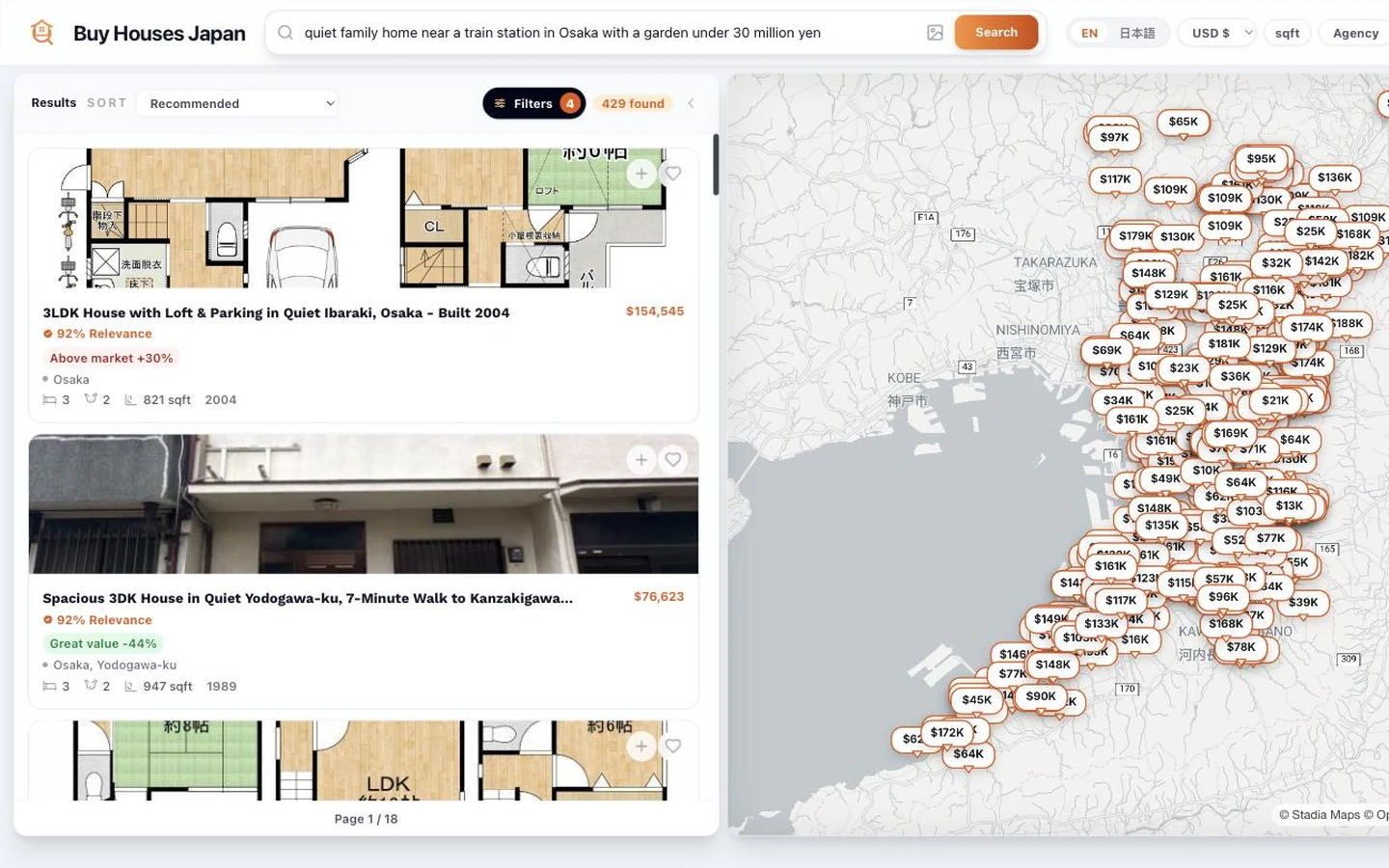
A run from the live product makes it concrete. The query:
quiet family home near a train station in Osaka with a garden under 30 million yen
produced four active filters: Prefecture Osaka, Property type house, a maximum price, and minimum bedrooms 3. Those four appear in the filter panel as ordinary editable fields, not as a summary of what the model thought. The user can change any of them, or ignore them and use the manual controls for location, home basics, price and size.

That query returned 429 matching listings, paginated across 18 pages, rendered as a card list beside an interactive map with price pins. The result count and the number of active filters stay on screen, so changing a filter shows its effect immediately.
Opening a result shows the Japanese source listing normalized into comparable fields: property type, layout, ownership, year built, nearest station and transport access kept in Japanese, zoning, and building and land area in m2. On top of that sit derived signals: a cleanliness read, renovation status, a relevance score (for example 92% Relevance) and a comparison against comparable prices (for example Above market +30% or Great value -44%), plus a photo and floorplan gallery and a link out to the original listing.

The architecture underneath is intentionally boring:
- Frontend. React 18 and Vite, built with Bun. The map is MapLibre GL through react-map-gl. The search input, the filter panel, the result list and the map all read one query state.
- Backend. FastAPI on Python with MongoDB via motor and beanie. Semantic and vector search runs through zvec.
- Parsing. Free text goes to the LLM through the house LLM gateway and comes back as structured filters that the user can see and override. Nothing the model produces is applied invisibly.
- Ingestion. Prefect pipelines read Nifty Real Estate every hour (a second source, Mynest, runs on demand) with Scrapling, analyse the photos with a vision model and normalize each listing into the fields the detail page shows.
- Platform. Firebase for auth, Stripe for payments.
The value is not only the AI step. The value is the full path from a messy sentence to a comparable shortlist. The model takes one slice; the rest is ordinary product engineering done deliberately. In practice, normalizing the Japanese listing data took considerably more work than parsing the natural language.
Why This Matters For B2B Buyers
Most useful AI products are not standalone chatbots. They are narrow workflows where a model translates messy input into structured action that the user can still correct.
That pattern transfers to support triage, document intake, knowledge search, internal admin tools, CRM workflows and reporting. The structure that makes Buy Houses Japan work is portable:
- A free-text input that does not pretend to be a conversation.
- A structured intermediate representation the user can see.
- Editable controls bound to that representation.
- A deterministic execution step the model does not touch.
- A result surface designed for comparison, not generation.
The same shape moves a support inbox from a chatbot demo to a working triage queue, and a knowledge search from a fluent answer to a cited recommendation. The difference between an AI feature and an AI product is whether that intermediate representation exists and whether the user can edit it.
What The Story Proves
Buy Houses Japan is a concrete example of product delivery scoped and built by the same person:
- Start with one high-friction user journey
- Build the app surface around the decision
- Use AI where it improves the workflow
- Keep outputs visible, editable and testable
- Handle the unglamorous parts, ingestion and normalization, as first-class work
That is the same discipline behind a paid PoC or MVP sprint. The first version should prove the product path, not pretend to be the entire platform. For B2B buyers evaluating whether to commission a sprint with Urbano DX, a live product we own and run is the most honest reference available: the architecture and the design decisions are on screen, and the search that produced 429 results can be re-run by anyone.